The Four TPN Shield Tiers: What Each One Asks of a Facility
.webp)
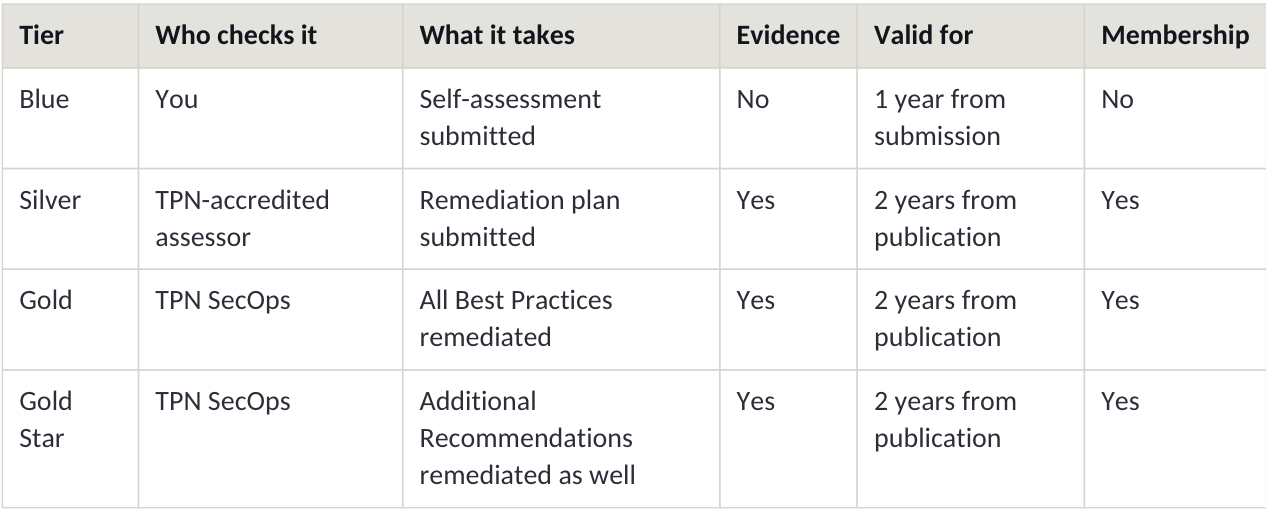
The Trusted Partner Network runs four Shield tiers, or levels, that a post-production facility can hold: Blue, Silver, Gold and Gold Star. Blue is the facility’s own self-assessment against the MPA Content Security Best Practices, and it is free. Silver adds an accredited assessor who checks those answers against evidence, plus a plan to close the gaps found. Gold means every Best Practice gap is closed and reviewed by TPN. Gold Star adds the Additional Recommendations. The four tiers replaced TPN’s two-tier model in September 2025, with questionnaire v5.3.1.
What changed in September 2025
Until 2025 the Trusted Partner Network had two Shields, Blue and Gold. On 7 August 2025 TPN announced a four-tier replacement, scheduled for early September 2025 and taking effect with the release of the v5.3.1 questionnaires and assessments. Silver and Gold Star were new. The old Gold, now Classic Gold, maps onto the new Silver: what it recognised was an assessment plus a submitted remediation plan, not closed gaps.
A Classic Gold Shield stays valid until its assessment expires, and that expiry date does not move, but it will not show remediation progress under the new model. Everyone else is on the four tiers: TPN’s FAQ states that all members must use them from v5.3.1 onwards. The English v5.3.1 Best Practices file published on TPN’s Resources page carries a date of 26 May 2026.
This is why much TPN guidance online is wrong rather than merely old: a 2024 guide calling Gold the top Shield was accurate when published and misleading now.
TPN’s president, Terri Davies, gave the reason on 25 September 2025: nearly 90 per cent of TPN members work on pre-release content, and TPN’s assessments show 96 per cent of vendors still have security gaps. Under the two-tier model a remediation plan was enough for the top Shield. The four tiers separate having a plan from having done the work.
Blue: your own answers, and nobody else’s
Blue is self-attestation. You answer the MPA Best Practices questionnaire for each of your sites and applications, TPN gives you a gap analysis, and you earn the Blue Shield the moment you submit. No assessor is involved, no evidence is required and no remediation is expected.
Blue is free and membership is not required to earn it. Your results are private: you see the gap analysis and nobody else does, and publishing your Shield to the TPN+ registry, where content owners can check it, needs a paid membership. It is also the shortest-lived tier, running one year from submission with an annual update asked for, where the three assessed tiers run two years.
The scope you set decides the questions. Your service categories, chosen from TPN’s standard list, determine which v5.3.1 controls apply, so a cloud-only provider is never shown site-only controls. Upload a valid ISO 27001 certificate and TPN pre-populates the matching answers.
Silver: an accredited assessor checks the evidence
At Silver an independent party arrives. You contract a TPN-accredited assessor yourself, from TPN’s assessor directory and paid directly, and they verify your answers against evidence, on site or remotely. You can run a pre-assessment with the same assessor first and update your answers before the assessment that counts.
The assessor then submits their work for TPN quality control, and the report publishes once QC approves it. Anything not in full compliance becomes a remediation item, and TPN says plainly that nearly every assessment finds several. You submit a remediation plan for each item, and it is that plan, not the assessment itself, that awards the Silver Shield.
Silver needs membership and evidence, and runs for two years from the publication of the assessment report. That date is fixed: climbing to Gold or Gold Star later does not reset it, because expiry stays tied to the report’s publication rather than to your remediation. The assessment itself must be completed and submitted within 15 business days, including pre-review and platform updates. This is the tier a Classic Gold Shield corresponds to.
Gold: every Best Practice gap closed and reviewed
Gold is the Silver remediation plan, carried out. You work through your remediation items in TPN+ and submit evidence, TPN SecOps reviews it with you and tells you what evidence is appropriate, and when every Best Practice item is remediated and reviewed you reach Gold.
There is no deadline. You hold Silver while you work, and partial progress counts.
What Gold signals is narrower and stronger than Silver: not that you were assessed, but that what the assessment found has been fixed and checked. In TPN’s words, Gold tells content owners you meet the security expectations of most MPA member studios.
TPN names the gaps that recur across the supply chain. Through the MPA’s 360 Strong programme: missing multi-factor authentication, weak passwords and social engineering risk. From its own assessment analysis: poor firewall controls, weak vulnerability management and a lack of penetration testing. Those are remediation items, which is to say the material that sits between Silver and Gold. Where a control lives in infrastructure a facility buys rather than builds, managed firewalls and VPN for example, the evidence your assessor wants comes from the supplier. Ask for it before the assessment, not during it.
Gold Star: the Additional Recommendations as well
The MPA Best Practices contain two kinds of control. Best Practices are the primary controls, reflecting the security expectations of most MPA member studios. Additional Recommendations are further layers, which content owners often ask for where extra security is needed.
Gold covers the first set. Gold Star covers both, again reviewed by TPN SecOps, and TPN says only a small percentage of assessments reach it.
The seven stages, and where the money starts
TPN describes the route as seven stages. The first four are free and need no membership:
1. Create your account and profile in TPN+: details, locations, subsidiaries and users.
2. Define your business operation by selecting your service categories. This is what content owners search on, and it sets which controls you are asked about.
3. Add your sites and applications, with no limit and no extra cost per entry. Security is assessed per site and per application, because in TPN’s words they form the complete picture of your environment. With more than three on the same security implementation, TPN offers a Global Pass process to cut duplicate data entry; ask before you start the questionnaires.
4. Take the self-assessment, which earns Blue.
The last three stages need a paid membership: get assessed by an accredited assessor, which earns Silver; remediate the Best Practices with TPN SecOps, which earns Gold; and remediate the Additional Recommendations, which earns Gold Star.
Membership is priced by annual gross revenue across ten bands, from 250 US dollars for a self-employed provider to 85,000 US dollars above 200 million dollars of revenue. Your band is visible only to TPN. Assessment costs are separate, and TPN suggests collecting more than one bid.
What a TPN assessment is not
This is the part most third-party guides get wrong, and it changes how you should prepare.
A TPN assessment does not produce a pass, a fail, a grade, a rating or a certification. TPN says so in its FAQ answer to “Can I fail a TPN assessment?” and again on its Where to Start page. What an assessment produces is a report: how a site or an application conformed to the MPA Best Practices at the time it was assessed, with anything short of full conformance listed as a remediation item. Content owners then make their own independent, risk-based decisions.
TPN does not certify a facility, and it describes participation as voluntary. Your answers are visible only to participating content owners and to the assessor you choose. Uploaded evidence is optional, and visible only to that assessor unless you mark each piece visible to content owners.
So if you are preparing for TPN as though for an exam you might fail, you are preparing for the wrong thing. What reaches your client is a list of what is not yet closed, and the tier on your Shield says how far through that list you have worked.
"I would say most people think that you either pass or fail TPN, whereas its actually an assessment and report that is made available to the studios to review. There isn't a TPN certification, just a report that says what you do right / wrong so having an assessment doesn't automatically mean you've passed. The latest 4 Tier system makes it easier at a glance to see how mature a vendors security posture is. The report is still important as it will contain important context about where a companies strengths and weaknesses are"
Patrick Sumby, VP Global Engineering, Sohonet
If you are preparing now
Start with the free half. The account, the scoping, the register of sites and applications and the questionnaire cost nothing, and the gap analysis tells you what an assessor would find before you pay anyone to find it. Nothing is visible to anyone else until you publish.
Then work out what your clients are actually asking for. A Shield they can see in the registry is a membership decision. Closed gaps rather than a plan means Gold. The Additional Recommendations on a sensitive title means Gold Star.
And check the date on anything else you read about TPN. A guide that predates September 2025 describes a programme that no longer exists.
Sohonet works with post-production facilities on the network side of this, on the Sohonet Media Fabric network.
Sources. Every fact in this article comes from the Trusted Partner Network’s own published pages, read on 15 September 2026: Where to Start, the FAQs, the Shield tier press release of 7 August 2025, Terri Davies’ post of 25 September 2025, the Membership page and the Resources page. TPN is wholly owned by the Motion Picture Association.

Get the latest news and updates from Sohonet in your inbox
.webp)
.png)